After success with Pillar Code Changes, next task of interest is using newer versions of Pharo. Pier is dependent on Magritte for the object model, it handles the issues of multiple web clients modifying a page.
At the moment, Pier can be loaded on Pharo version 12 without issue, but once someone tries to log in, add a comment, or any action that is time-related, the image has a walk back coming from GRPharoPlatform>>magritteTimeStamp which references TimeStamp. This was a class in the old images which was replaced by DateAndTime around a decade ago.
Found that someone else had already submitted a pull request to fix this and other issues about a week ago.
This adventure starts with noticing that email addresses that contained underscores are not recognized by Pier, like this random mix of letters:
john_borden@myborden.com
Adding the update as an extension in Pier works, but is not a good practice.
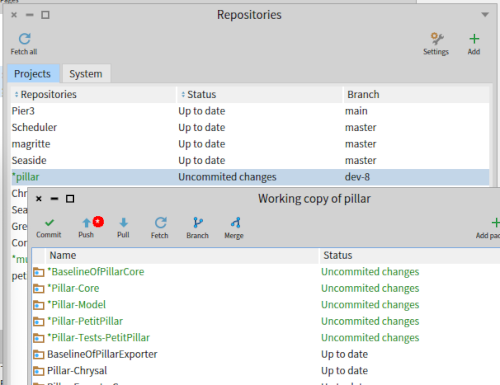
Another dilemma is that manual steps are necessary to load the tests into a Pier image (loading core and model tests). In Iceberg, it shows most of pillar having changes:
First thing was that the markups package from the
dev-8 branch of Pillar was loading Pillar core from the
dev-7 branch.
Fixing this caused errors with a missing class - when loading the Pillar-ExportPillar initialize code fails:
       PRPillarCanvas>>initialize
             ...
                PillarCharacters := Dictionary new.
                PRPillarGrammar markups
                        valuesDo:
The class PRPillarGrammar was unknown. This was in src/Pillar-PetitPillar, which requires PP2CompositeNode.
Proceeding to fix this allows everything to load, but Pier is no longer functional:
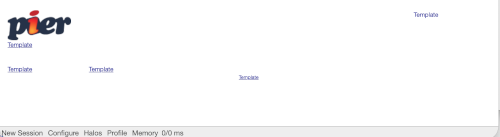
All of the links are pointing to root, like this:
*/*
One of the largest changes between the dev-7 and 8 branches is that PRInternalLink has the target instance variable removed. Adding it back resolves many of the load errors and allow Pier to display the introduction page. The Pillar and Pier tests all pass.
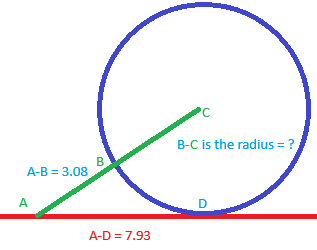
Recently, I downloaded Pharo for an iPad from this link. The source is listed on GitHub. This was used to solve a math problem - finding the radius:
Using the Pythagorean theorem:
(A-D)2 + (B-C)2 - (A-C)2 = 0
So with values:
7.932 + r2 - (3.08 + r)2 = 0
Starting with two guesses for the radius of 4 and 9 provided results on either side of zero, so we can guess numbers in-between until the result was very small:
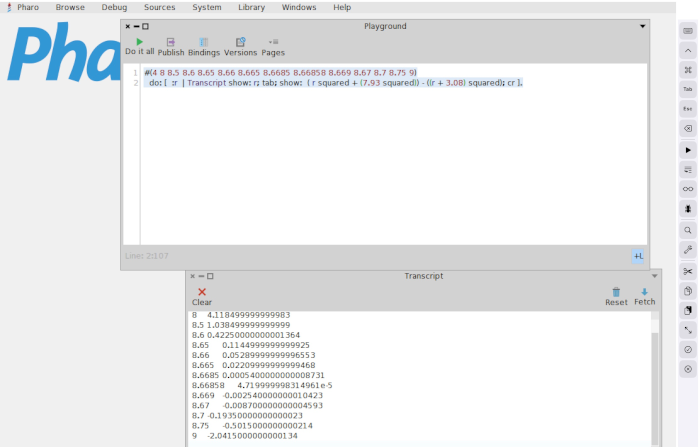
#(4 8 8.5 8.6 8.65 8.66 8.665 8.6685 8.66858 8.669 8.67 8.7 8.75 9)
  do: [  :r  | Transcript show: r; tab; show:  ( r squared + (7.93 squared)) - ((r + 3.08) squared); cr ].
Which gives the output:
4	28.758499999999984
8	4.118499999999983
8.5	1.038499999999999
8.6	0.42250000000001364
8.65	0.1144999999999925
8.66	0.05289999999996553
8.665	0.02209999999999468
8.6685	0.0005400000000008731
8.669	-0.002540000000010423
8.67	-0.008700000000004593
8.7	-0.19350000000000023
8.75	-0.5015000000000214
9	-2.0415000000000134
I have not had success with loading code from GitHub or starting a zipped file, but having Smalltalk on a portable device is useful.
Screenshot - Notice the buttons on the far-right of the screen are the main controls:
Recently Seaside 3.6 removed JavaScript string support in favor of a canvas and brushes. This causes a walkback when the editor is opened in Pier:
Seaside Walkback
MessageNotUnderstood: Message not understood: JSStream>>#stream
Debug Proceed Full Stack
Possible Causes
- you sent a message this type of object doesn't understand
Stack Trace
- thisContext
     JSStream(Object)>>doesNotUnderstand: #stream
It comes from this method:
PRWysiwygEditor>>renderSetEditorHtmlContentJS
        | renderer wysiwygHtml jsStream |
        renderer := PRWysiwygEditorRenderer new.
        wysiwygHtml := WAHtmlCanvas builder
                render: [ :r |
                        renderer withinContentDo: [
                                renderer start: self document in: self on: r ] ].

        jsStream := JSStream new.
        jsStream nextPutAll: 'pierWysiwygEditor.setEditorHTML('.
        JSStream encodeString: wysiwygHtml on: jsStream stream.
        jsStream nextPutAll: ')'.

        ^ jsStream
The message encodeString:on: has also been removed from JSStream. To patch this problem, the old methods were moved into PRWysiwygEditor.
Suppose a task is to add a button in Pier to execute code. One way to do that is (code download):
- Create a class to describe the parameters sent with the button click. For this example a single string is given:
Object subclass: #PRAdHocObject
	instanceVariableNames: 'parameter'
	classVariableNames: ''
	package: 'Pier-Forms'
- Add read and write accessors:
PRAdHocObject>>parameter: aString
	parameter := aString

PRAdHocObject>>parameter
	^ parameter ifNil: [ parameter := '' ]
- Create a method describing the parameter:
PRAdHocObject>>descriptionParameter
	<magritteDescription>
	^ MAStringDescription new
		  parameterName: 'parameter';
		  accessor: #parameter;
		  beSearchable;
		  priority: 120;
		  label: 'Parameter';
		  beRequired;
		  beEditable;
		  yourself
- Create a component by defining a class
PRViewComponent subclass: #PRAdHocFormView
	instanceVariableNames: ''
	classVariableNames: ''
	package: 'Pier-Forms'

PRAdHocFormView class>>isAbstract
	^ false
- Create a render method
PRAdHocFormView>>renderContentOn: html

	| component |
	(self context isValidCommand: PREditCommand)
		ifTrue: [
			html form: [
				html render: (component := PRAdHocObject new asComponent).
				html submitButton
					callback: [
						component save.
						Transcript
							show: 'The button was pushed: ';
							show: component model parameter;
							cr ];
					with: 'Push' ] ]
		ifFalse: [
			html render:
				'Edit is not valid in this context - no button to push' ]
- Create a class for the structure
PRStructure subclass: #PRAdHocForm
	instanceVariableNames: ''
	classVariableNames: ''
	package: 'Pier-Forms'
- Wire it up with the view created earlier
PRAdHocForm>>viewComponentClass
	^ PRAdHocFormView
- Next is the work in the web browser
WebBrowser openOn: 'http://localhost:8080/pier'.
- Add a link, choose PRAdHocForm: The list of options is generated in
PRAddCommand>>#structureClasses, along with the the permissions to add that class for the user. Either use an admin user or add the permission under the Change Owner link - Set the title of the page to be more readable
- Type some test text in the parameter, click the button
After the button is clicked, the following should appear in the transcript:
The button was pushed: This is the parameter as text
Unfortunately this does not provide the operator much feedback that the button was clicked, but adding that code would double the size of the example.
This code was taken from previous work in
PierWorkout.